In-Browser Manuscript Editor
Write, format, cite, and export publication-ready biomedical manuscripts directly in any modern web browser—with zero Microsoft Word Desktop or Office Add-in installation required.
Built for researchers working on university workstations where Microsoft AppSource or add-in sideloading is locked down, as well as authors drafting on macOS, Linux, or Chromebook, the In-Browser Manuscript Editor (/editor) combines a full manuscript authoring canvas with real-time PubMed search, AI-powered literature tools, and two-way Microsoft Word (.docx) round-trip compatibility.
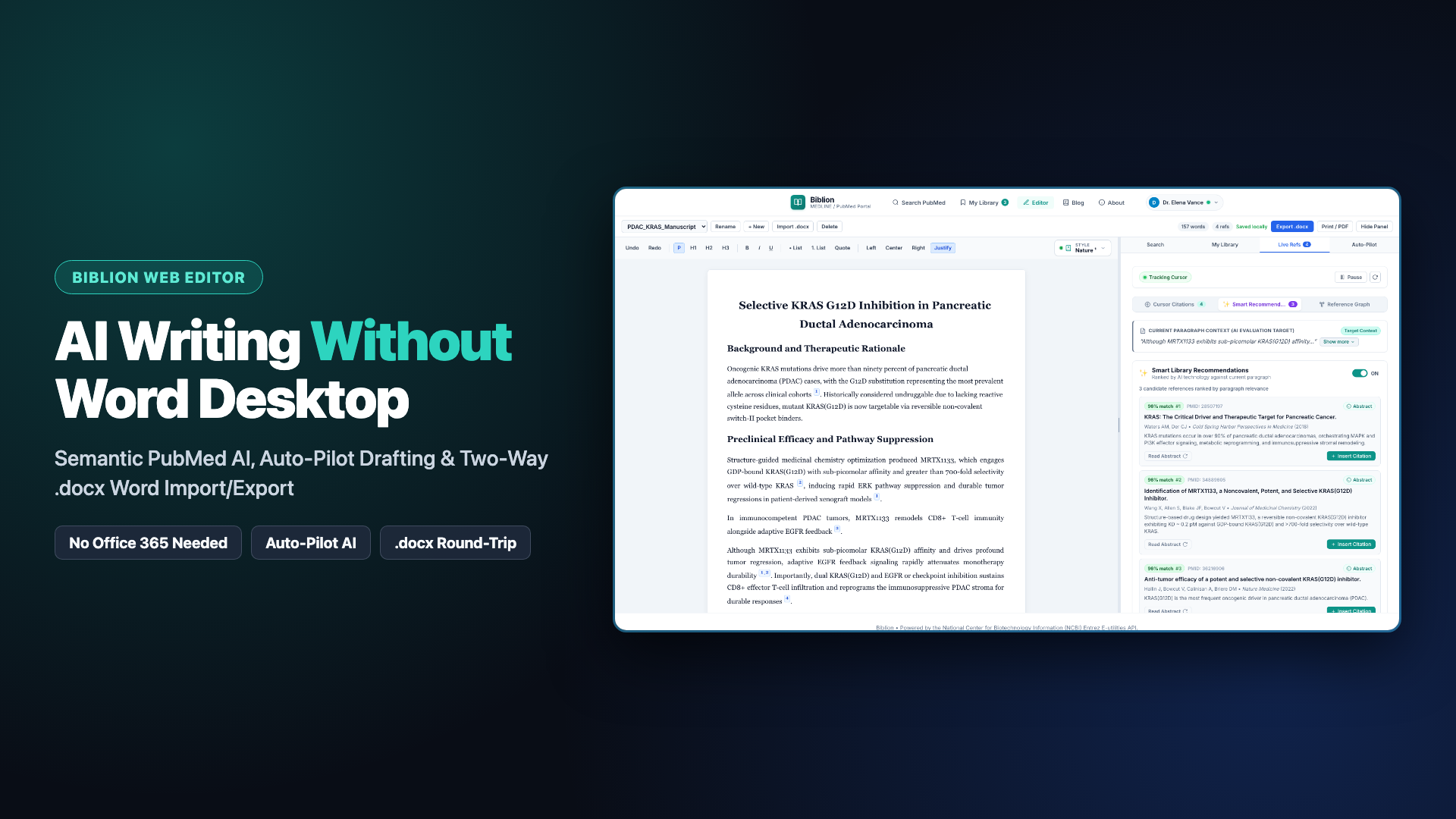
Video Walkthrough: ▶️ Watch the In-Browser Manuscript Editor Walkthrough on YouTube (https://youtu.be/TAj-uy4YRkw)
1. Access & Workspace Availability
| Feature Area | Free Registered Account | Biblion Pro / 15-Day Free Trial |
|---|---|---|
Rich-text manuscript drafting (P, H1–H3, B/I/U, Lists, Alignment) | Included | Included |
| Multi-document workspace & local IndexedDB autosave | Included | Included |
Two-way Microsoft Word (.docx) import and export with preserved citations | Included | Included |
| Instant switching across all 6 citation styles + live References section | Included | Included |
| Print / PDF output with US Letter 1-inch Word-style typography | Included | Included |
| PubMed Search, 3D Abstract Flip Cards & Live Refs (Cursor Citations) | Included | Included |
| Multi-device Cloud Sync across browser sessions and Word | — | Included |
| Smart Library Recommendations, AI Query Rewriter, Semantic Re-Ranking & Auto-Pilot | — | Included |
2. Getting Started
- Open the Editor: Click Editor in the top navigation bar (or visit
/editor) and sign in with your Biblion account (or click Create Free Account). - Start Fresh or Import a Word Draft:
- Click + New to create a blank manuscript, Rename to title it, or use the document dropdown to switch between saved drafts.
- Click Import .docx to upload an existing Microsoft Word manuscript. Biblion automatically parses embedded Biblion Word citation controls and reconstructs inline citation pills, library cards, and a unified References section.
- Draft and Format: Use the formatting toolbar (
Undo/Redo,P,H1–H3, B/I/U, bulleted/numbered lists, Quote, and Left / Center / Right / Justify text alignment) on the manuscript canvas. - Adjust Your Assistant Pane: Drag the vertical divider between the manuscript page and the right sidebar to widen or narrow the research assistant, or click Hide Panel / Show Panel for distraction-free writing.
3. Docked Research & AI Assistant Tabs
The right-hand workspace gives you full parity with the Biblion Microsoft Word Add-in right next to your text:
Search (PubMed & AI Semantic Literature Re-Ranking)
- Enter standard PubMed keywords or plain-English clinical questions.
- Click AI Rewrite (Pro / Trial) to translate natural-language questions into precision Boolean and MeSH search queries.
- Run AI Search (Pro / Trial) to evaluate candidate articles with the Biblion AI Semantic Relevance Engine, surfacing the highest-scoring studies ranked by Semantic Match Percentage.
- Click Abstract on any result card to inspect full abstracts in 3D, or click Insert Citation to place a formatted inline citation directly at your cursor.
My Library
- Browse your saved articles, custom collections, and tags without leaving your manuscript.
- Click Insert Citation on any saved reference to cite it in text and add it to your live bibliography.
Live Refs (Cursor Citations & Sentence-Tailored Smart Recommendations)
- Cursor Citations: Move your cursor anywhere in the manuscript to inspect references cited in the active sentence (
S1,S2, ...) or toggle to Paragraph granularity. Use Scan All Document Citations to view every unique citation across the manuscript, and safely remove individual references from grouped citations with one click. - *Smart Recommendations (Pro / Trial): Toggle Smart Library Recommendations ON to activate Contextual AI Relevance Scoring* across your personal library.
- Recommendations are tailored to the active sentence at your cursor, while passing the containing paragraph context for biological and clinical disambiguation.
- Use the sentence chips (
S1,S2, ...) directly inside Smart Recommendations to preview candidate papers for any sentence in the current paragraph immediately. - Flip recommended cards in 3D to verify study details, then click Insert Citation to cite directly into your draft.
Auto-Pilot (Pro / Trial)
- Highlight rough notes or an existing passage in the editor and open Auto-Pilot.
- Select supporting references from your personal library, choose your drafting strategy, and generate cohesive biomedical prose grounded strictly in your selected studies—complete with verified inline citations inserted at your selection.
4. Citation Formatting & Journal Typography
- Automatic Citation Grouping: Inserting a citation adjacent to or onto an existing inline citation merges them cleanly into a single grouped citation (for example,
[1–3],1,3, or(Alpha, 2023; Zulu, 2022)). - Instant Switching Across 6 Journal Styles: Choose APA 7th Edition, IEEE, AMA 11th Edition, Vancouver / NLM, Nature, or Harvard from the toolbar selector. Every inline citation pill and the end-of-document References list reformat instantaneously.
- Publication-Compliant Citation Typography: Numeric superscript styles (AMA 11th Edition and Nature) match publisher specifications without vertical line distortion, and all references render in uniform manuscript typography.
5. Two-Way Word (.docx) Compatibility & Print / PDF
- Export
.docx: Click Export .docx to download a standard Microsoft Word document containing your headings, alignment, formatted paragraphs, and bibliography. Every inline citation is written as a native Microsoft Word content control (<w:sdt>), so collaborators opening the file in Word Desktop or Office 365 can continue re-indexing, switching citation styles, and inspecting references with the Biblion Add-in. - Print / PDF: Click Print / PDF for a clean print-ready layout with US Letter (
8.5" × 11") paper sizing,1.0 inmargins,Times New Romantypography, hanging-indent numbered bibliographies, and all web navigation chrome excluded.