Write, Cite, and Export Word Manuscripts Directly in Your Browser — Without Installing Office Add-Ins
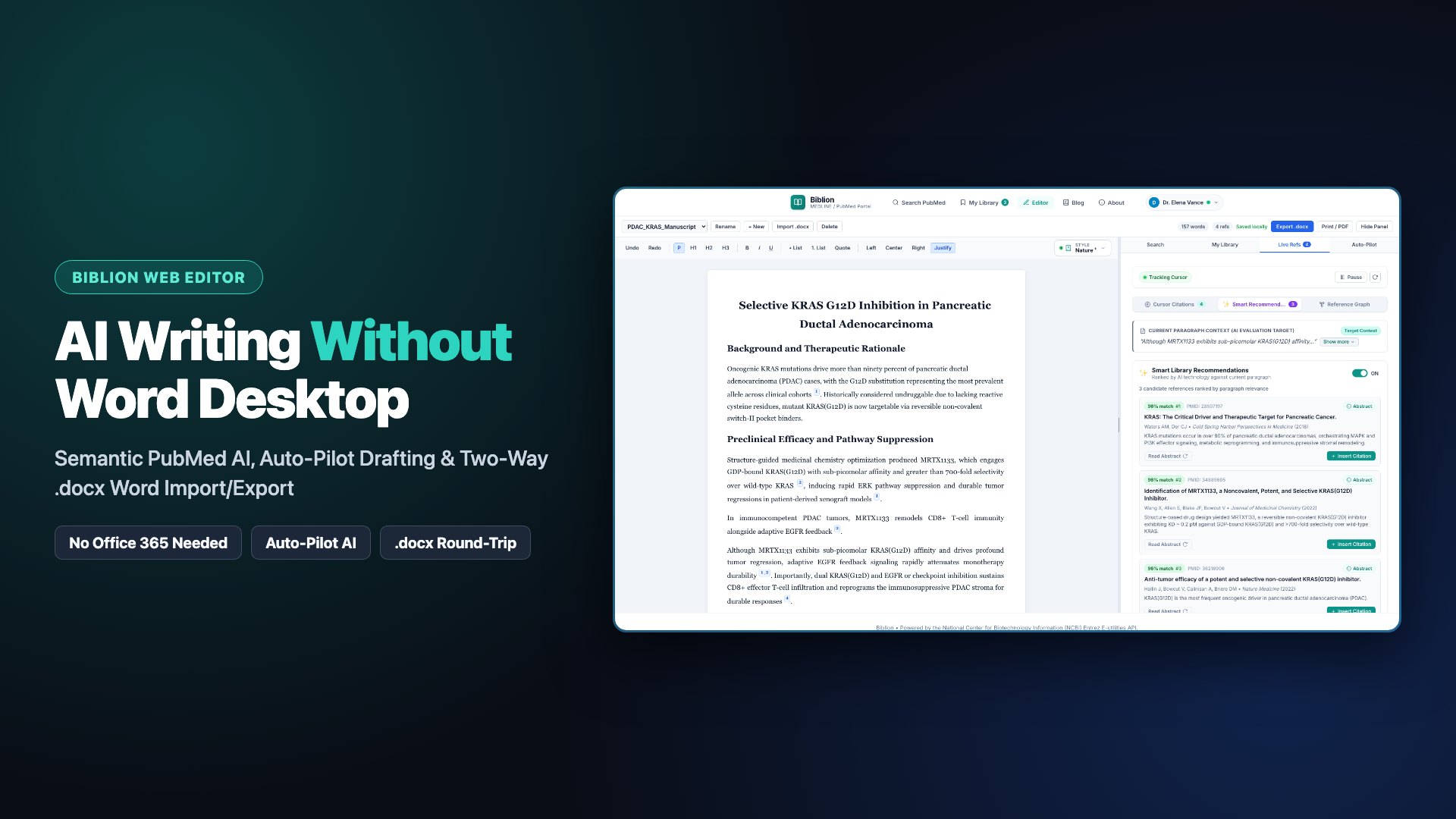
Meet the Biblion In-Browser Manuscript Editor: draft biomedical papers on Mac, Windows, Linux, or Chromebook with AI-assisted PubMed search, sentence-tailored Smart Recommendations, journal-compliant typography, and two-way Microsoft Word (.docx) compatibility.
Academic writing shouldn't stall because an institutional computer blocks Office Add-ins, or because you prefer drafting on Linux or Chromebook instead of paying for desktop word-processor lock-in.
Today, the Biblion In-Browser Manuscript Editor brings Biblion's full biomedical citation and AI research studio straight into any modern web browser—while preserving complete two-way compatibility with Microsoft Word (.docx) collaborators.
Why We Built a Browser-Native Manuscript Editor
Until now, researchers using browser-based citation tools faced an awkward divide: web companions were great for searching PubMed and saving PDFs, yet active manuscript drafting, automatic bibliography renumbering, and style reformatting required Microsoft Word Desktop or Office 365 add-in permissions.
At many universities, hospital networks, and shared laboratory workstations, IT policies disable Microsoft AppSource and add-in sideloading altogether. On Linux desktops and Chromebooks, desktop add-ins aren't an option at all.
The In-Browser Manuscript Editor (/editor) closes that gap. You can now draft complete manuscripts, insert and merge citations, reformat journal styles instantaneously, and hand editable .docx files back and forth with Microsoft Word co-authors—entirely inside Chrome, Safari, Firefox, or Edge.
Two-Way Microsoft Word (.docx) Compatibility—Not a One-Way Export
Most web editors treat .docx export as a flat snapshot: once you download your file, your co-authors in Microsoft Word are stuck with plain text citations that break if they add or move a paragraph.
Biblion solves round-trip collaboration cleanly:
- Import Existing
.docxDrafts: Click Import .docx to load an ongoing Microsoft Word manuscript into your browser. Biblion parses embedded Word citation content controls automatically, reconstructing every interactive inline citation pill, live abstract card, and unified numbered References list. - Edit & Collaborate Anywhere: Rewrite sections, reorganize arguments, insert new studies, merge adjacent citations (
[1–3]), or switch styles cleanly in the browser. - Export Native
.docxFiles: Click Export .docx to generate a standard Microsoft Word document with native Biblion Word content controls intact. When a co-author opens your exported.docxin Microsoft Word Desktop or Office 365, every citation remains fully managed and re-indexable.
Full Research, AI, and Live Citation Parity Next to Your Manuscript
The In-Browser Manuscript Editor pairs a rich-text manuscript canvas—supporting headings (H1–H3), inline formatting, lists, blockquotes, alignment (Left, Center, Right, Justify), and an adjustable split-pane divider—with the complete four-tab Biblion assistant:
1. AI Query Rewriter & Semantic Literature Search
Stop fighting complex PubMed Boolean syntax. Type a clinical or mechanistic question in plain English and click AI Rewrite to generate a structured Boolean and MeSH query. Then run AI Search to evaluate candidate articles with the Biblion AI Semantic Relevance Engine, surfacing papers ranked by Semantic Match Percentage ready for one-click merged citation insertion.
2. Live References & Sentence-Tailored Smart Recommendations
Click into any sentence in your manuscript and open Live Refs:
- Cursor Citations: See the exact papers cited in the sentence under your cursor (
S1,S2, ...), flip any reference card in 3D to verify full PubMed abstracts, or switch to Paragraph granularity and safely remove individual references from grouped citations. - *Smart Recommendations (Pro / Trial): Turn on Smart Library Recommendations to activate Contextual AI Relevance Scoring* across your saved personal library. Recommendations are tailored specifically to the active sentence at your cursor, while taking the containing paragraph context into account to disambiguate biological terms and experimental scope.
3. Auto-Pilot AI Drafting (Pro / Trial)
Highlight rough bullet notes in your draft, choose supporting articles from your saved library, and let Biblion Auto-Pilot synthesize cohesive scientific prose grounded strictly in your selected evidence—complete with verified inline citations inserted right at your selection.
4. Journal-Ready Styles & Word-Grade PDF Print Typography
Switch between APA 7th Edition, IEEE, AMA 11th Edition, Vancouver / NLM, Nature, and Harvard in one click from the toolbar. Numeric superscript formatting complies cleanly with AMA 11th Edition and Nature typography guidelines, and clicking Print / PDF outputs a clean US Letter manuscript (1.0 in margins, Times New Roman, centered headings, justified prose, and hanging-indent references) with web chrome hidden.
Choosing Your Workspace: Browser Editor vs. Word Add-in
| Capability | Web Companion | In-Browser Manuscript Editor (/editor) | Microsoft Word Add-in |
|---|---|---|---|
| PubMed Search, AI Query Rewriter & 3D Abstracts | Yes | Yes | Yes |
| My Library, Collections, Tags & Multi-Format Export | Yes | Yes | Yes |
| Interactive Rich-Text Manuscript Canvas | — | Yes (Browser) | Yes (Desktop & O365 Word) |
| Live Refs (Sentence & Paragraph Scoping) | — | Yes | Yes |
| Sentence-Tailored Smart Recommendations | — | Yes | Yes |
| Auto-Pilot Evidence-Grounded Drafting | — | Yes | Yes |
| Instant 6-Style Switching & Grouped Citations | Copy to Clipboard | Yes (In-Document) | Yes (In-Document) |
Two-Way .docx Round-Trip Citation Preservation | — | Yes (Import & Export) | Native Word File |
Try the In-Browser Manuscript Editor Today
Every registered Biblion user gets free access to multi-document browser drafting, local IndexedDB autosave, .docx import/export, live citation grouping across all 6 styles, and PubMed search—with a complimentary 15-day free trial unlocking multi-device Cloud Sync, AI Query Rewriter, Precision Literature Re-Ranking, sentence-tailored Smart Recommendations, and Auto-Pilot.
Watch the Walkthrough & Explore the Docs
- ▶️ Watch the In-Browser Manuscript Editor Walkthrough on YouTube (https://youtu.be/TAj-uy4YRkw)
- Detailed User Guide: In-Browser Manuscript Editor Documentation
- Live References & Smart Recommendations Guide: Live References Documentation
- Start Writing Now: biosystechnologies.com