Biomedical researchers and clinical scientists operate under continuous cognitive and temporal strain. Preparing a high-impact manuscript, grant application, or clinical review requires synthesizing dozens of complex publications, structuring intricate scientific arguments, and accurately citing evidence across thousands of words.
Yet when examining the modern landscape of AI-assisted scientific tools, researchers routinely run into two painful bottlenecks:
- Ergonomic Friction: Tools that fragment focus—forcing authors to juggle PubMed tabs, separate PDF readers, standalone citation managers, and Microsoft Word, constantly breaking the flow of deep work.
- Economic Exploitation: Enterprise SaaS platforms that bundle commodity AI behind steep $30–$50 monthly subscription markups, opaque "credit" systems that expire, artificial usage quotas, and locked-in, outdated language models.
At Biblion, we believe scientific tools should be designed with opposite principles: frictionless cognitive ergonomics that preserve your writing flow, combined with radical economic transparency that puts you in complete financial and architectural control.
In this guide, we break down the optimal workflow for getting the most out of Biblion, explain why our Bring-Your-Own-Key (BYOK) model delivers unprecedented flexibility, demonstrate how to track feature-level AI spending with OpenRouter, and provide concrete, token-level cost calculations showing why drafting an entire research article costs pennies.
Part 1: The Ergonomics of Biblion — The 3-Stage Research & Writing Workflow#
Cognitive ergonomics is about designing digital environments that match human working memory. Context-switching between applications drains mental energy and causes drafting fatigue.
Biblion bridges the chasm between literature discovery and manuscript drafting through a cohesive 3-stage workflow.
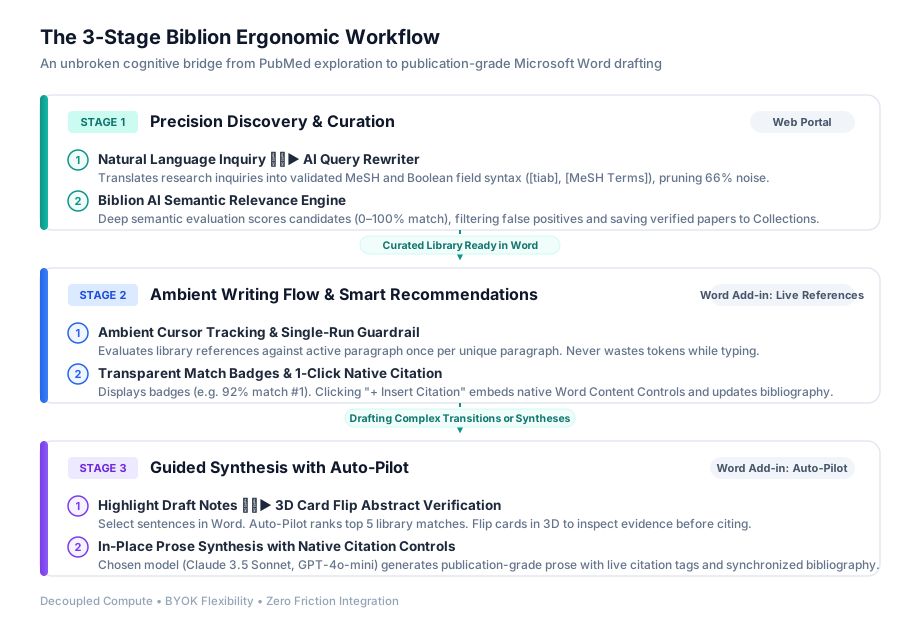
Stage 1: Precision Discovery (Biblion Web & Search Pane)#
The most common mistake in literature discovery is entering raw keywords into traditional search bars and scrolling through dozens of irrelevant citations.
- AI Query Rewriter: When you begin an inquiry, express your core biological or clinical question in plain, natural language (e.g., "KRAS G12D inhibitor resistance mechanisms"). The AI Query Rewriter automatically converts your query into high-precision NCBI Boolean syntax with validated Medical Subject Headings (
[MeSH Terms]) and Title/Abstract ([tiab]) tags. This prunes up to two-thirds of irrelevant database noise immediately. - Biblion AI Semantic Relevance Engine: Keyword Boolean search retrieves relevant candidate records, but cannot understand biochemical nuances. Biblion's Deep Biomedical Semantic Evaluator evaluates candidate abstracts against the conceptual essence of your inquiry, assigns continuous Semantic Match Percentages (e.g., 94% Semantic Match), and filters out lexical false positives.
- Curate into Collections: With a single click, save validated papers into organized, topic-specific collections in your Personal Library.
Stage 2: Ambient Writing Flow (Word Add-in: Smart Library Recommendations)#
Once you begin drafting in Microsoft Word, leave the web browser behind. Open the Biblion Word Add-in taskpane and switch to Live References.
- Ambient Cursor Tracking: As your cursor rests within a paragraph, Biblion observes the active sentence context and matches it against your saved Personal Library.
- Real-Time Match Badges: Without interrupting your writing, Biblion presents relevant library citations in the taskpane with clear badges—such as
92% match #1—alongside author names, year, journal, and abstract previews. - Single-Execution Protection: Writing requires continuous backspacing, rewriting, and tweaking sentences. Biblion's client is engineered with a strict single-execution policy: it evaluates only once per unique paragraph. Cursor movements within unchanged text never trigger redundant evaluations or cost extra tokens.
- 1-Click Native Word Citations: Clicking + Insert Citation inserts a native Word Content Control at your cursor and instantly formats the in-text citation and document bibliography in your chosen journal style (APA 7th, Vancouver, AMA, Nature, Harvard, etc.).
Stage 3: Guided Synthesis (Word Add-in: Auto-Pilot)#
When drafting dense transitions, synthesizing literature summaries, or expanding rough bullet points into formal academic cadence, use Biblion Auto-Pilot:
- Highlight rough draft notes or bulleted hypothesis points directly inside your Word document.
- Auto-Pilot immediately evaluates your Personal Library and surfaces the top 5 most relevant articles matching the selected text.
- Inspect abstracts via 3D Card Flip: Click on any reference card to flip it in 3D and read the complete PubMed abstract, verifying factual claims before citing.
- Select references and click Generate: Your chosen AI model synthesizes your notes and the checked references into coherent, academic prose, placing native citation tags (
[PMID:...]) at the precise locations where evidence supports each claim. The text replaces your draft selection, and the bibliography updates automatically.
Part 2: The Economics of Biblion — Why "Bring Your Own Key" (BYOK)?#
Most AI writing software follows a closed, high-margin SaaS model: they charge $30 to $50 per month, conceal the underlying model, meter usage with proprietary "credits", and keep the 90%+ margin between wholesale compute and retail pricing.
Biblion was designed with a radically different philosophy: decoupling application software from raw compute.
| Feature Dimension | Traditional AI SaaS Platforms | Biblion BYOK Architecture |
|---|---|---|
| Pricing Model | $30–$50/month with markup & expiration | Modest software subscription + direct raw compute at cost |
| Wholesale LLM Markup | 500% to 1,000% marked up | 0% markup (you pay raw inference provider pricing) |
| Model Choice | Locked into whatever model the vendor chooses | Unrestricted choice (OpenRouter, Anthropic, OpenAI, Gemini) |
| Model Upgrades | Wait months for vendor engineering updates | Immediate access the minute a new model is released |
| Usage Limits | Hard monthly token limits or credit caps | Unlimited usage bounded only by your own API balance |
| Data Privacy | Prompts often logged in vendor databases | Direct client-side HTTPS to provider with zero server storage |
The Power of Flexibility#
With BYOK, you are never locked into a single AI lab or architecture:
- If Anthropic releases an improved Claude model, you can select it immediately in Biblion settings without waiting for a software update.
- If you prefer Google Gemini's speed or OpenAI's reasoning capabilities, you simply toggle your provider.
- If you are part of a university or hospital with enterprise API keys, you can plug in your institutional credentials directly.
Part 3: Selecting Providers and Models — Why OpenRouter is the Best Option#
Biblion supports direct connections to four leading AI providers: OpenRouter, Anthropic, OpenAI, and Google Gemini.
While connecting directly to Anthropic or OpenAI works smoothly, OpenRouter is our strongest recommendation for 95% of researchers.
Why OpenRouter is the Gold Standard for Biblion#
- One Key Unlocks Over 200 Models: A single OpenRouter API key gives you instant access to Claude 3.5 Sonnet, GPT-4o, GPT-4o-mini, Gemini 2.5 Flash, Llama 3.3 70B, and specialized decision models. You never need to manage four separate billing accounts with different credit card authorizations.
- Prepaid Safety (Zero Surprise Invoices): Unlike direct provider APIs that require post-paid credit card billing (where a runaway loop or accidental batch job can rack up unexpected charges), OpenRouter operates on a pre-paid balance. You deposit $5 or $10, and usage stops when your balance reaches zero.
- Granular Usage & Token Transparency: OpenRouter's web dashboard provides real-time analytics displaying the exact prompt tokens, completion tokens, latency, and fractional-cent cost of every single API request.
- Wholesale Pricing with No Upcharge: OpenRouter passes through raw model token costs with zero price markups, fully supporting prompt caching and low-cost routing.
Recommended Model Selection Matrix#
Depending on the feature and task, selecting the right model optimizes the balance between analytical precision and speed:
| Biblion Feature | Recommended Model (OpenRouter ID) | Strengths | Cost Profile |
|---|---|---|---|
| Auto-Pilot Synthesis (Academic Prose) | anthropic/claude-3.5-sonnet | Unmatched academic tone, nuanced scientific reasoning, flawless citation syntax | Moderate (~0.6¢ per paragraph) |
| Auto-Pilot Synthesis (Budget / Fast Drafts) | openai/gpt-4o-mini or google/gemini-2.5-flash | Extremely rapid generation, highly capable for standard narrative framing | Ultra-low (~0.03¢ per paragraph) |
| AI Query Rewriter (Boolean & MeSH) | openai/gpt-4o-mini or google/gemini-2.5-flash | Exceptional Boolean syntax accuracy, instant response time | Negligible (~0.01¢ per search) |
| Smart Library Recommendations | Ultra-efficient semantic decision evaluator | Continuous relevance scoring directly from your local library | Micro-cost (~0.001¢ per check) |
Part 4: Granular Financial Visibility — Tracking Spending with Separate API Keys#
One of the greatest challenges for research laboratories, principal investigators (PIs), and academic departments is understanding the structure of AI spending. In standard bundled subscriptions, AI costs appear as an undifferentiated black box.
Biblion solves this by allowing users to configure independent API keys for each distinct feature in AI Settings (⚙️):
- AI Query Rewriter Key
- Smart Library Recommendations Key
- Auto-Pilot Drafting Key
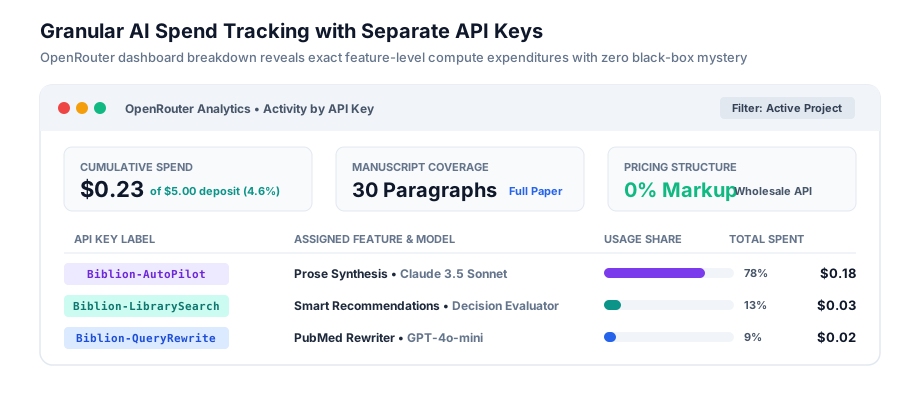
How to Set Up Granular Tracking in 3 Minutes:#
- Log in to your OpenRouter account (
openrouter.ai/keys). - Generate three distinct keys with descriptive labels:
Biblion-AutoPilotBiblion-QueryRewriteBiblion-LibrarySearch
- Open Biblion in your browser or Microsoft Word, click AI Settings (
⚙️), and select the feature tab to assign each key.
Now, whenever you review your OpenRouter dashboard, you have complete financial visibility:
- You know exactly how much of your grant or personal budget was spent discovering new literature versus drafting text.
- Laboratory managers can assign separate keys to graduate students or postdocs to audit AI expenditures per project.
- You can experiment with different models on specific features (e.g., using low-cost
gpt-4o-minifor query rewrites while reservingclaude-3.5-sonnetfor Auto-Pilot) without cross-subsidizing costs.
Part 5: Real-World Cost Breakdown — The Math of Cents and Pennies#
How much does it actually cost to use Biblion in real research scenarios? Let's analyze the exact mathematics of token consumption and pricing.
Scenario A: The Cost of Drafting One Polished Paragraph#
Suppose you are drafting a paragraph in your Introduction. You highlight 3 rough sentences in Word (~60 words) and select 2 relevant library abstracts (~500 words of background evidence).
- Input Prompt Context:
- System instructions & academic framing guidelines: ~350 tokens
- Draft bullet points / notes: ~80 tokens
- 2 candidate abstracts and citation metadata: ~650 tokens
- Total Input Tokens: ~1,080 tokens
- Output Generated Text:
- 150 words of publication-grade prose with embedded citation tags: ~200 tokens
Let's calculate the cost across different models:
| Model | Input Pricing (per 1M tokens) | Output Pricing (per 1M tokens) | Calculation | Cost for 1 Paragraph |
|---|---|---|---|---|
| Claude 3.5 Sonnet | $3.00 | $15.00 | (1,080 × $0.000003) + (200 × $0.000015) | $0.0062 (~0.6¢) |
| GPT-4o-mini | $0.15 | $0.60 | (1,080 × $0.00000015) + (200 × $0.0000006) | $0.00028 (~0.03¢) |
| Gemini 2.5 Flash | $0.075 | $0.30 | (1,080 × $0.000000075) + (200 × $0.0000003) | $0.00014 (~0.014¢) |
Even if you include ambient Smart Library Recommendations evaluation across 10 candidate papers (~$0.00014), drafting a complete, cited paragraph with the world's premier frontier model costs roughly six-tenths of one cent. With lightweight models, it costs a small fraction of a single penny.
Scenario B: The Cost of Drafting an Entire Research Article#
Consider drafting a standard 30-paragraph biomedical manuscript (~4,000 words, including Introduction, Methods rationale, Results interpretation, and Discussion).
Here is the realistic cumulative compute budget across the entire project lifecycle:
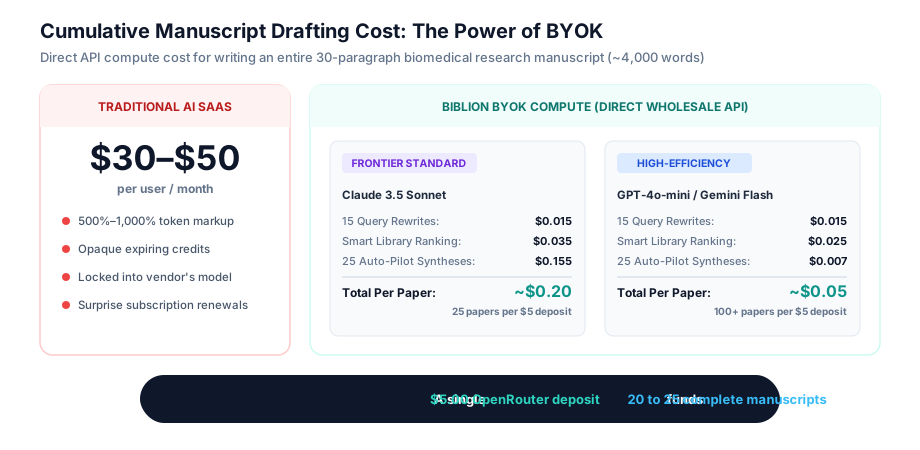
What Does a $5 OpenRouter Deposit Buy You?#
Because raw API pricing is so inexpensive:
- With Claude 3.5 Sonnet: A single $5 deposit funds the drafting of 20 to 25 complete, high-impact research articles.
- With GPT-4o-mini or Gemini Flash: A single $5 deposit funds over 100 full-length research manuscripts.
Compare this to paying $30/month for an all-in-one AI tool: over a single year, you would spend $360 on a proprietary subscription to perform work that requires less than $5 in direct compute.
Part 6: Zero-Persistence Privacy on Clinical & Hospital Workstations#
Academic researchers, clinicians, and medical fellows frequently draft manuscripts on shared hospital computers, library terminals, or shared departmental workstations.
In these settings, credential leakage and manuscript privacy are primary concerns. Biblion enforces a strict zero-persistence security lifecycle:
- Direct Encrypted Transport: All AI interactions originate directly from your client browser or Microsoft Word Add-in over encrypted TLS 1.3 HTTPS. Your draft text and manuscript contents are never routed through or stored on Biblion's backend servers.
- Volatile Session Storage: In the Word Add-in, your API credentials are stored strictly in volatile session memory. The moment you close Microsoft Word or log out of your session, your API keys are immediately purged from the machine.
- No Model Training: Direct API requests to OpenRouter, Anthropic, and OpenAI are governed by commercial API agreements that strictly prohibit using prompt inputs for model training.
Part 7: Step-by-Step Setup Guide: Start Writing in 5 Minutes#
Getting started with Biblion's BYOK workflow requires just a few straightforward steps:
1. Create Your OpenRouter Account#
Visit OpenRouter and sign up. In the dashboard, deposit $5 or $10 using a credit card or crypto. This balance will easily sustain months of intensive manuscript drafting.
2. Generate Your API Key(s)#
Navigate to Keys in OpenRouter. Create a master key or three feature-specific keys (Biblion-AutoPilot, Biblion-QueryRewrite, Biblion-LibrarySearch). Copy the keys to your clipboard.
3. Enter Keys in Biblion AI Settings#
Open Biblion in your web browser or Microsoft Word taskpane:
- Click the AI Settings gear icon (
⚙️) in the top navigation. - Select OpenRouter as your AI Provider.
- Paste your API key and choose your preferred model (e.g.,
anthropic/claude-3.5-sonnetfor Auto-Pilot). - Click Save.
4. Experience Frictionless Flow#
Open Microsoft Word, enable Smart Library Recommendations, highlight your draft notes in Auto-Pilot, and experience what modern scientific drafting was meant to be: complete cognitive flow with total economic control.